
ChatGPT now displays product suggestions, complete with images, prices, reviews, and links when people ask it shopping-related questions. These recommendations aren’t ads they’re chosen based on information ChatGPT finds online.
Here’s how anyone can get started in just a few easy steps:.
Step 1: Access the Form
OpenAI provides an interest form where you can sign up to be notified when merchant product feed submissions go live. You can find it on their “Help ChatGPT discover your products” page.
Here is a direct link to the submission page: https://openai.com/chatgpt/search-product-discovery/
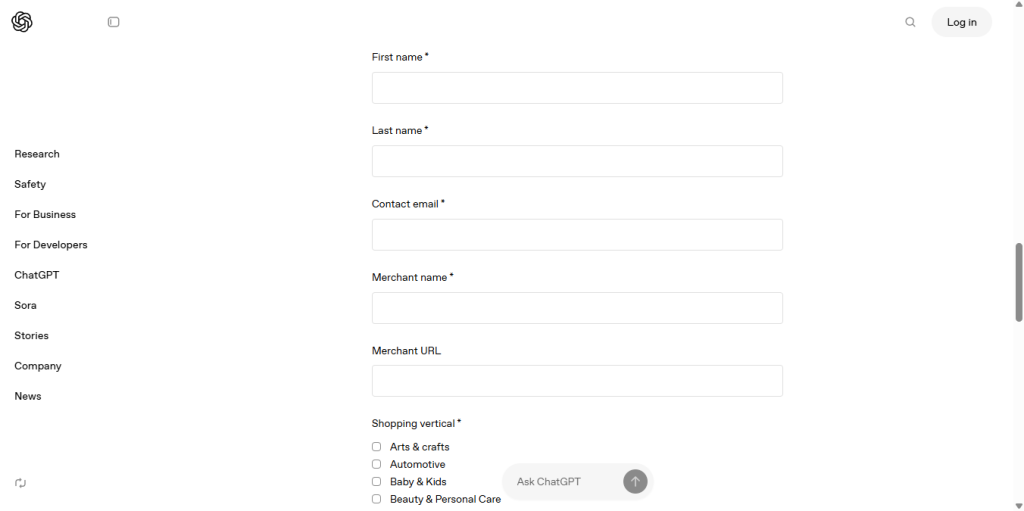
Step 2: Understand the Form Fields
Here’s what you’ll need to fill in:
- First name
- Last name
- Contact email
- Merchant name (your store or brand) so for example “Kofi Manu Store”
- Merchant URL (your website URL)
- Shopping vertical – choose the applicable category (e.g., Electronics & Gadgets, Home & Kitchen, Fashion & Apparel, etc.).
Step 3: Example of How to Fill It Out
| Field | Example Entry |
|---|---|
| First name | Ama |
| Last name | Owusu |
| Contact email | ama.owusu@example.com |
| Merchant name | GreenLeaf Artisans |
| Merchant URL | https://greenleafartisans.com |
| Shopping vertical | Arts & Crafts |
Step 4: Submit the Form
Once you’ve filled in all the fields, click Submit. OpenAI (The Developers of ChatGPT) will notify you when the official product feed submission window opens.
Additional Prep Tips
- Ensure ChatGPT’s crawler isn’t blocked: Make sure that your website’s
robots.txtallows OpenAI’s crawler (OAI-SearchBot) to access your pages. This ensures ChatGPT can crawl your products. - Implement product metadata: When you’re ready for actual feed submission, having structured
Productschema (for example, JSON‑LD with name, image, price, availability, etc.) helps ChatGPT surface accurate product info.
Summary Checklist
- Open the OpenAI interest form page (via the link on the product discovery guide).
- Complete each required field (first name, last name, email, merchant name, URL, vertical).
- Submit.
- Meanwhile, ensure crawler access and prepare product metadata for future submissions.
Tap here to join my FREE community to get all updates like these JOIN